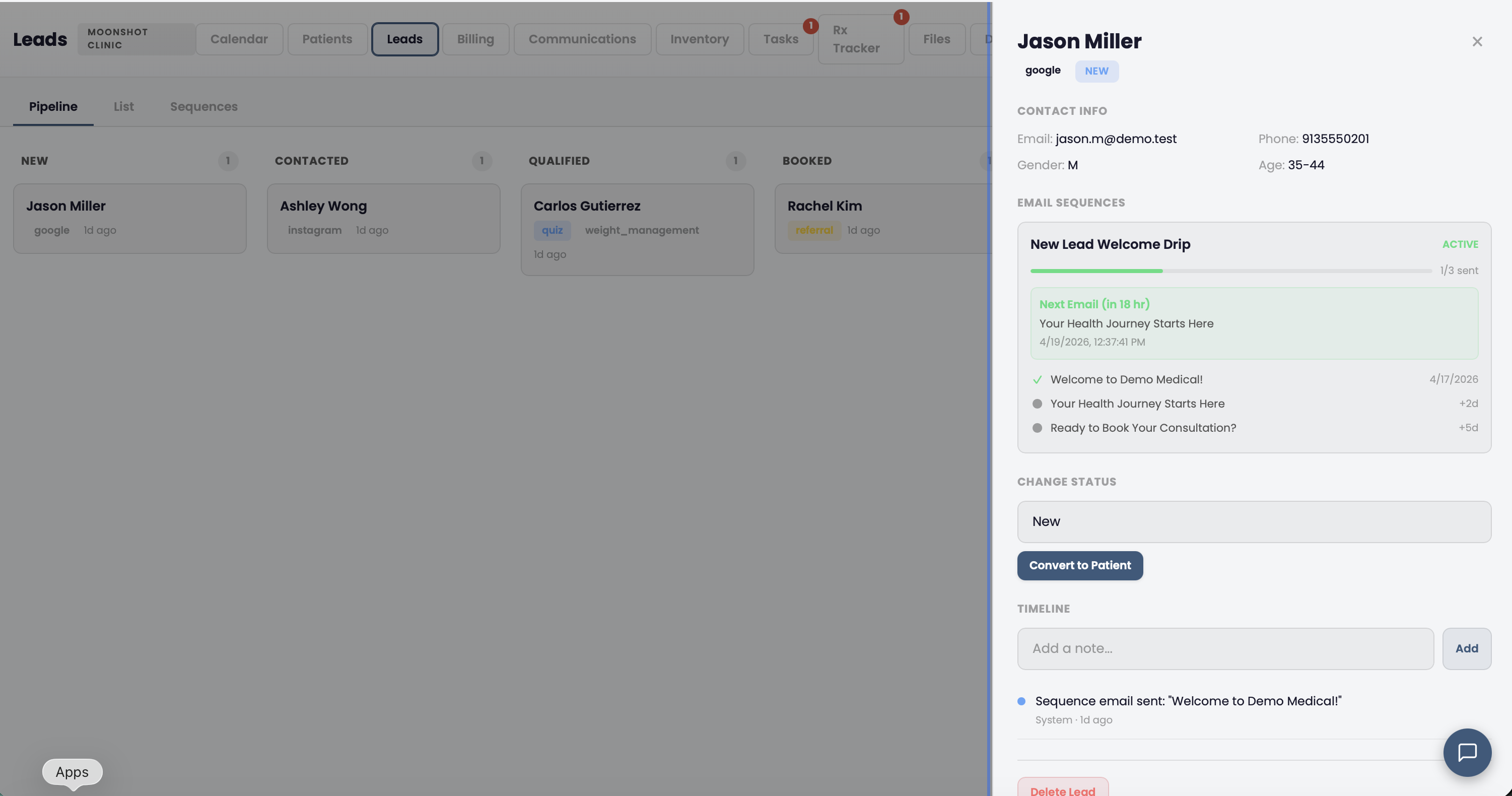
Every Lead in a Visual Pipeline

Leads move through defined stages from first contact to conversion. No spreadsheets. No guessing who called back whom. Every interaction is logged with timestamps so your team knows exactly where each prospect stands.

  • Six pipeline stages: New, Contacted, Qualified, Booked, Converted, Lost
  • Drag leads between stages or update status from the detail view
  • Notes and interaction timeline on every lead record
  • Filter and sort by source, status, assigned staff, or date range

Full Pipeline Visibility

See every lead, every stage, and every touchpoint at a glance.

New Contacted Qualified Booked Converted

Automated Email and SMS Follow-Up

Build multi-step drip sequences that nurture leads without manual effort. Each sequence combines email and SMS steps with configurable delays -- send a welcome email immediately, then an SMS two days later, then a follow-up email on day five.

  • Multi-step sequences with email and SMS channels
  • Configurable delays between each step (hours or days)
  • Auto-pause on conversion, opt-out, or manual override
  • Execution logging so you can see exactly which step each lead is on
  • Pre-built drip templates: 5 emails over 7 days for new leads across any service line

Set It and Forget It

Sequences run on autopilot. Your leads get timely follow-up without staff effort.

Know Which Marketing Channels Actually Convert

Every lead is tagged with its source -- Google Ads, Instagram, quiz, word of mouth, referral partner. Moonshot tracks the full path from lead capture to paid patient so you see ROI per channel, not just cost per click.

  • Automatic referral source tagging on webhook-captured leads
  • Conversion rate and revenue per source in analytics
  • Lead capture via webhooks from website forms, quizzes, and landing pages
  • One-click lead-to-patient conversion that creates a full patient record

Source Attribution

Stop guessing which ads work. See exactly which channels drive revenue.

Sales and Clinical Data in One Screen

When a lead converts to a patient, their entire history comes with them -- lead notes, interaction timeline, referral source, and sequence engagement. Your providers see how the patient found you and what they were interested in before they ever walked in the door.

  • One-click conversion from lead to patient record
  • All lead data transfers to the patient profile automatically
  • Full lifecycle view: marketing touchpoints through clinical encounters
  • No data silos between your sales and clinical teams

Lead to Patient

One click converts a lead into a full patient record. No data re-entry.

Frequently Asked Questions

Can Moonshot Clinic replace GoHighLevel for my clinic?
For most cash-pay clinics, yes. Moonshot includes lead capture via webhooks, a full pipeline (new, contacted, qualified, booked, converted, lost), automated drip sequences over email and SMS, referral source tracking with ROI, and one-click lead-to-patient conversion. The key difference is that your CRM lives inside your EHR, so you see the full patient lifecycle -- from first website visit through clinical care -- in one system. You no longer need to sync contacts between a marketing tool and a separate medical record.
How do automated sequences work?
You build multi-step sequences with email and SMS steps, each with a configurable delay. When a lead enters the sequence (manually or via webhook trigger), the system sends each step on schedule. Sequences pause automatically if the lead converts, opts out, or is marked lost. You can monitor delivery and engagement from the leads dashboard.
How does referral source tracking work?
Every lead captured via webhook includes a referral source tag (Google Ads, quiz, Instagram, referral, etc.). Moonshot tracks conversion rates and revenue per source so you can see which channels produce paying patients -- not just clicks. This data feeds into the analytics dashboard for ROI reporting across all your marketing spend.

Replace GoHighLevel with Your EHR

See how Moonshot handles lead capture, drip sequences, and conversion tracking inside the same system you use for charting and billing.

Get Started